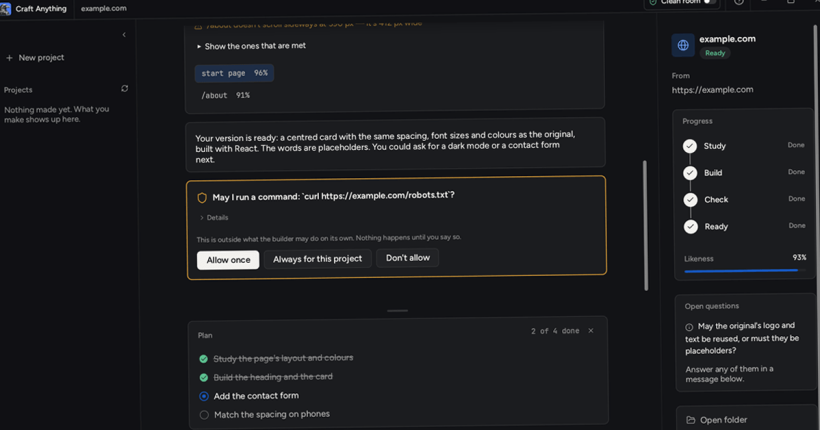
Have you ever come across a software or website that you just wanted to make on your own? But, you had no idea where to begin. Well, Craft Anything helps you understand how softwares and websites work and then, helps you craft your own. So, you can now clone websites, software, apps and games while understanding how they work.
What is Craft Anything?
Craft Anything is the next big thing from the GitHub user, storytold. That name might sound familiar, because it’s the same person who vibecoded Adobe applications from scratch. Now, they have come up with Craft Anything, an open source software written in Rust that technically lets you do what storytold did with Adobe apps, to virtually any other application or website.
By the way, here’s how their GitHub page defines the project:-
See how any website, app or game works, then have AI build your own version; an open-source, clean-room engine in pure Rust.
Point it at a target, say what you want, and it studies the original with real inspection tools, has a coding agent build a new project, checks the result against the original and refines it.
Since it’s written in Rust, you can use it over various OSes including Windows, Linux, FreeBSD and even MacOS.
And, no doubt, it does require AI (Claude Code, Grok Build, GitHub Copilot, etc.) to actually build once it studies the target software or website.
Also, it also supports starting fresh projects with no reference to any existing app, game or website.
How does Craft Anything work?
Their GitHub page explains the whole process in 4 steps:-
Step 1. Study
This step doesn’t require AI agents. As the name suggests, you give Craft Anything link to a website, a software executable, a game executable or their files, etc. and the program uses inbuilt tools to understand how it works. There are two modes for inspection which dictate how deep Craft Anything can inspect the target – Clean Room and Deep Mode.
Clean Room does not attempt to read original source code or files. Instead, it relies on screenshots, text, colours and fonts, visitor-visible behaviour, etc. to understand how the system works. It mostly works on visual inspection of what’s seen by any user. And, don’t worry, you don’t have to provide it the assets. The app by itself will capture screenshots, read text, etc.
Deep Mode, on the other hand is the advanced study engine that’s capable of looking into the source code, application files, etc., and even goes into binary analysis, disassembly, decompilation, etc. It also supports advanced reverse engineering engines like Ghidra, if they are installed.
During this step, it may ask you for access if it’s stuck or ask you for confirmation when it’s confused or when there are more than one way out.
Step 2. Build
Once it has understood what the target is, it is ready to build. Here, you can take the wheel to pass the final command as to what you are looking for. You could say something like, “Recreate this game in Python” and the connected coding agent will get to work. The best part is, it doesn’t matter if the original project is in Python or C++, you can always ask it to rewrite using a different language, framework or engine. If it isn’t explicitly specified, the system itself chooses a “sensible default,” as specified by storytold on the GitHub page.
Step 3. Check everything
Every build undergoes a direct comparison to the original. For a game, it would try running it, allowing the system and you to compare and check if everything is as expected. It keeps refining it until the project is as close to (if not same) the original project.
Step 4. Ready
You can now open the app, play the game or preview the resultant project. You may then ask for any refinements, additional features, etc. to be added. While the inspection doesn’t require AI, it will be needed to code any additional refinements you request. Craft Anything supports about 320 tools as CLI commands (non-GUI; can be run without human intervention in the background, making it suitable for our use case). On top of that an MCP tool is also builtin, which makes sure that any AI agent is capable of using the same engine as the app or game.
How to clone a game, website or software with Craft Anything?
- Download the latest version for your OS from Releases page.
- Install or run the app.
- The first time you run it, it will give you two options – I’m new to this and Show me everything. You can click on Skip setup to skip all of this, but, I’d suggest you click on I’m new to this (for an easier setup wizard). If you’re an expert, choose the second option.
- In the next setup, you can add information for your AI provider, including address, API key, etc. Same goes for Harnesses. You can also choose No AI for now if you don’t have a subscription as of now. Once done, click on Continue.
- Next is a survey question asking you about your intentions. Answer accordingly and click on Continue.
- Click on Let’s go.
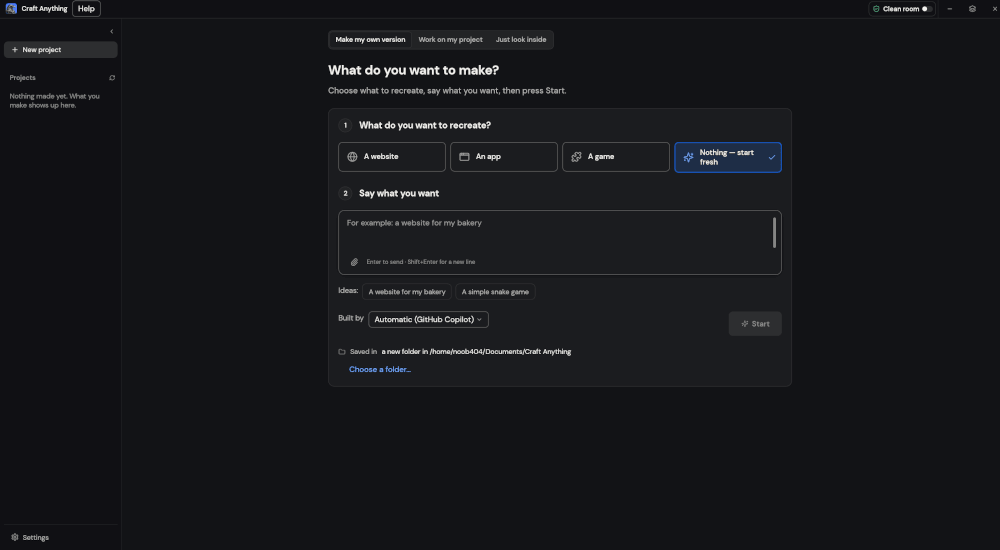
- Now, the project wizard gives you four options for what you want to create/re-create (choose what you want):-
- A website
- An app
- A game
- Nothing – start fresh
- For a website, you will have to provide URL, for an app or game, choose executable file or an archive containing all the files.
- Choose Clean Room or Deep depending on what you want.
- In the box that reads, “Say what you want,” just tell it to recreate the game or app.
- Once set, click on Start.
- This will begin the first step (Study). Then, you can just follow along for the other steps.
Conclusion
I am just going to say it aloud right now. Use it responsibly. The article is purely for educational purposes and doesn’t promote copying copyrighted or trademarked data or anything illegal. Continue with the above article and its instructions at your own risk.
Leave a Reply